AI Service overview
Overview
The AI Service brings a range of advanced AI features to the platform. This service was introduced in Platform version 5.0 and offers a collection of AI components which facilitate a more natural human-language type interaction with platform data.
The AI Service enables application developers to define and configure intelligent agents which can process user prompts, retrieve real-time data and return intelligent, context-aware responses.
AI Service features
The AI Service supports the following features:
- Users can seamlessly execute AI agents.
- Several agents can collaborate to handle tasks in multi-agent workflows.
- Agents can auto-select the most appropriate tools for each task.
- AI Teams group multiple agents in a team to interact sequentially to achieve a goal.
- Project administrators can securely configure Large Language Model (LLM) API keys for the AI Service to use.
- You can assign preferred LLMs to each agent. Currently, the platform supports all OpenAI models.
- Supports the Model Context Protocol (MCP) which is an open-source standard for connecting AI applications to external systems.
Note: For a good understanding of basic AI concepts refer to the AI Concepts page.
AI Service resources
The AI Service provides the following first-class resources that are owned by a namespace. Users can create these resources and share them with other users with the platform permissions model.
Note: All platform users can access tool and agent resources.
The relationship between AI service resources is as follows:
- A conversation recruits a team
- A team manages agents
- Agents use tools and reference knowledgebases
For more information, see the following AI Service resources:
- Agent: An AI-powered component that understands input, can invoke tools, and then responds based on its assigned role. You can configure agents to process user prompts and retrieve real-time data.
- Team: A group of agents configured to work together sequentially to solve a task.
- Tool: A utility or API integration that helps agents retrieve or process platform data.
- KnowledgeBase: A collection of helpful information that the LLM can search through in order to answer questions more accurately.
- Conversation: The interactive session that maintains context between the user and the team across multiple turns.
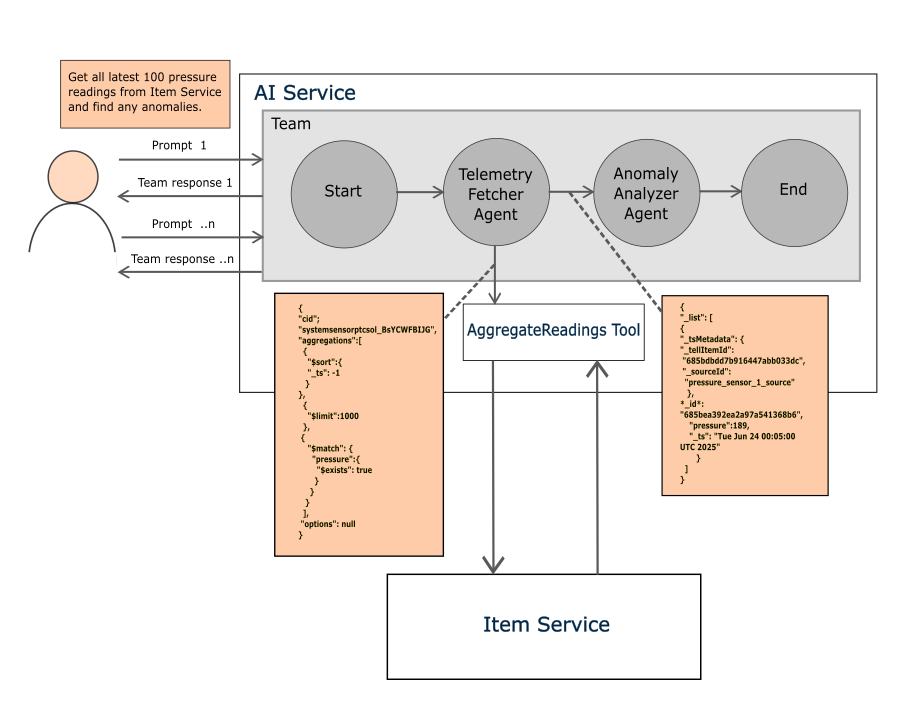
Sample data flow between Agents, Teams, and APIs
Figure: Data flow within AI Service
AI Service API key
Project administrators must store the OPENAI_API_KEY to enable the AI Service. The OPENAI_API_KEY is maintained separately for each namespace.
The key is encrypted both at test and in transit. Trusted clients such as the AI Service can securely retrieve the decrypted secret.
Managing the AI Service in Workbench
To configure agents, teams, knowledge bases, MCP tools, MCP servers, prompt templates, and providers in a browser, use the Workbench AI Service workspace. For more information, see AI Service and AI Chat.